



V11 mobile traffic light: setup guide
From the truck to two lights that give green in turn: unfolding, connecting, menu, times, synchronisation and placement, plus everything the display can show.
- 2
- lights, no cable between them
- 12 V
- about 150 h on a new 100 Ah battery at 20 °C
- 1–495 s
- times of 1–99 s, or 5–495 s in x5 mode
- 6 days
- at most between two synchronisations
What is in the set
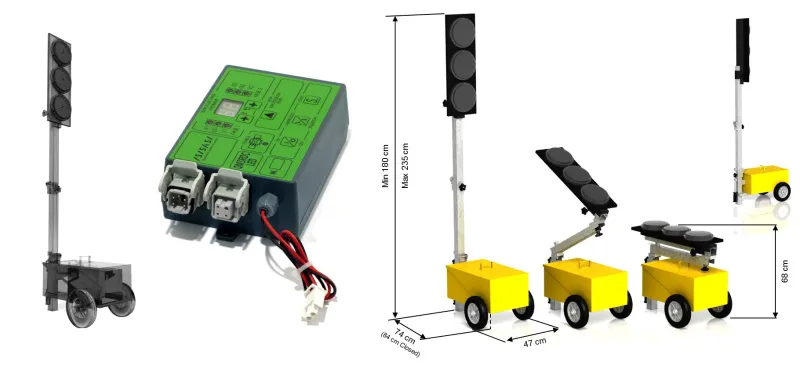
Two lights built from the same parts. Each has a wheeled battery trolley, a folding pole, a head with 3 Ø200 mm LED lights and its own control unit. Only the phase set in the menu tells them apart: one is F1, the other F2.
- 2 × 12 V batteries, one per light, or a 12 V power pack. Not included.
- Two free hands or two people for the simultaneous start (step 5).
- The rest of the works signage: signs and cones, as per the signage plan.
- The lights are set up by a trained person who knows the traffic rules and has basic electrical knowledge.
- The set runs with no cable between the lights (quartz synchronisation). In this mode, staff must be present in the work zone for as long as the lights are running.
- Start only with charged batteries. If Lb shows on the display, change the battery before work.
- While running, the case cover stays closed with the split pin in, so nobody can reach the unit and water stays out.
Unfold the lights
The light travels folded, with the head lying over the case. Do the steps below on both lights.
Whenever the light is open, the fixing handles must be tight. To pack up, reverse the steps: loosen the handles, fold the pole over the case, tighten the handles and move the light by its handle.
Connect the battery and the head
The control unit sits in the case, next to the battery. On its front it has two sockets and the power lead.
- Open the case cover: it swings back 180°. Put the 12 V battery in the case.
- The plug on the head cable (5-pole male connector) goes into the unit's head socket, the first on the left in the drawing.
- The second socket is for a communication cable the set does not use. Keep its cover closed.
- Connect the unit's power lead to the battery terminals: red to +, black to −.
- The white plug on the power lead is the easiest place to disconnect when you open the menu or reset the unit.
- Leave the cover open until you finish steps 3–5. Then close it and put the split pin in.
The control unit panel
The panel labels are in Italian. Here is what each part does. R, G and V stand for red, yellow (giallo) and green (verde).
Check the menu settings
Check the menu the first time you set up, after a reset and after replacing a control unit. The rule is simple: every setting the same on both units, except the phase.
| Menu | Setting | Values | On the V11 set |
|---|
Never run two units on the same phase. To avoid mixing them up on site, mark them, for example with an F1 and an F2 sticker on the case.
How to open the menu
Set the three times
The cycle has three times you choose: the green for direction 1, the green for direction 2, and red-red, when both lights stay red so the last vehicles can leave the section. Each runs from 1 to 99 s, or from 5 to 495 s in x5 mode. After a reset, all three are 10 s.
How much red-red do you need?
The last vehicle to enter on green has to be out of the section before the other direction gets green. So red-red must be at least as long as it takes to drive through the section.
Add a margin for slow lorries and plant. If the signage plan approved for the works gives other times, use those.
How to set the times
The times must be identical on both units. The display values in the steps are an example.
Synchronise and start
Each unit keeps the cycle with an internal (quartz) clock. For the two clocks to start together, the lights are started side by side and only then taken to the ends of the section.
- Bring the lights side by side with both units in STOP: the displays show F1 and F2.
- Check once more: one unit F1, the other F2, the same times and the same menu settings on both.
- Press S. START at the same moment on both units, with two hands or two people, on “3, 2, 1”.
- Take the lights to the ends of the section. They can stay on. If you want them off on the way, use I/O only, never STOP: the clock keeps running and, when switched back on, the light resumes the cycle in sync.
Place and check
Under SR 1848-1:2024, the mobile traffic light is placed on a narrowed road section to direct the two directions of traffic alternately. One light at each end, visible to the drivers it stops. There is no cable between them, so the distance is limited only by the drive-through time, which has to fit in the red-red.
✓Check after placing
- Watch one full cycle. When one light is green, the other must be red. If you cannot see the other end, check by phone with a colleague.
- If a code shows on the display, see What the display shows.
- Close the covers and put the split pins in.
!While they run
- Staff stay present in the work zone.
- The lights are re-synchronised at least every 6 days (step 5).
- On a safety problem, such as a failed red light, the light switches itself to flashing yellow until it is fixed.
Breaks, batteries and shutting down
Two buttons stop the light, but they do different things. I/O keeps the synchronisation, ▲ STOP loses it.
I/OBreaks or overnight
I/O switches the lights and the unit off, but the internal clock keeps counting the phases. When you switch back on with I/O, the light picks up the cycle in sync with the other one.
▲STOP ends the cycle
After STOP, the display shows F1 or F2 and the cycle stops. To run again, repeat step 5: the lights side by side and START at the same moment.
L.S.Flashing yellow
Press L.S. and the light switches to flashing yellow. Press it again and the cycle restarts, as long as STOP was not pressed in between. For the whole section, do it on both units.
6Re-sync within 6 days
The two units' clocks are not linked. At least every 6 days, bring the lights side by side and repeat step 5, even if you only switched them off with I/O in between.
+Changing the battery
You can change the battery at any time: an internal backup keeps the clock running, so the synchronisation is not lost. Re-sync only if more than 6 days have passed since the last one. After Lb or Eb, fit the charged battery and press START to clear the message.
■When the works end
Press STOP once, until F1 or F2 shows, then I/O. Disconnect the battery and put it on charge, fold the pole (step 1 in reverse) and move the light by its handle.
What the display shows
For light faults, the dash next to the E sits level with the failed light: top for red, middle for yellow, bottom for green.
Codes E1–E6 belong to a cable mode the set does not use. If one shows while running, check menu d: it must be d0. Inside the menu, E0 and E1 are the countdown setting, not faults.
Factory reset
A reset clears everything you set. Afterwards the unit has: phase 1, x1 times, standard yellow, red-red 10 s, phase 1 green 10 s, phase 2 green 10 s.
After a reset the unit is on phase 1. If you reset the F2 unit, open the menu and set A2, then check the rest of the menu and the times so they match the other unit.
Spare parts and technical data
| Code | Part | When you need it |
|---|---|---|
| V11-CONTROL | Control unit, for V11-20 and V11-21 | The unit no longer works or was damaged. After fitting, repeat steps 3 and 4. |
| V11-D200-R | Red Ø200 mm LED light | Code E‾; fits at the top of the head. |
| V11-D200-Y | Yellow Ø200 mm LED light | Code E-; fits in the middle. |
| V11-D200-G | Green Ø200 mm LED light | Code E_; fits at the bottom. |
| V11-SUPORT | Complete head with 3 lights, no countdown | The head housing is broken (V11-20 set). |
- Supply
- 12 V battery or power pack
- Head power
- max. 32 W at 12 V
- Autonomy
- ≈150 h, new 100 Ah battery, 20 °C
- Temperature
- −20…+70 °C
- Lights
- Ø200 mm LED, intensity follows ambient light
- Height
- 180–235 cm
- Weight
- 46 kg per light, 92 kg the set
- Compliance
- CE, Directive 2004/108/EC
Atto Trafic support
+40 (724) 322 232
office@attotrafic.ro
Mon–Fri 08:00–17:00
Guide based on the control unit user manual (April 2013 edition, rev. A2) and the traffic light data sheet. Display values in the illustrated steps are examples. Version of 28.10.2026.
In road safety since 1998
Atto Trafic supplies complete road signage and safety equipment — signs, traffic signs, markings, parking barriers, speed bumps, mirrors, bollards and accessories.
- Durable products, compliant with STAS and SR EN
- ISO 9001 / 14001 / 45001 / 27001 / 20671 certified
- Constant stock, delivery within 24-48 hours
- Support for municipalities, contractors, private car parks